
Domain Name System

Basic function of Domain Name System (DNS) is to translate domain names to IP and vice-versa. It’s the phonebook of the computer. Why you may ask, because human’s remember domain names easily, wikipedia.org is easier than 103.102.166.224 . The IP is then used by the computer to fetch required resource for us.
But, DNS also contains other information like Mail Exchanger (MX) records, Nameserver (NS) records, Text (TXT) records amongst other information.
DNS records
Section titled “DNS records”DNS systems serves various information through various records. List of major DNS record type:
- A record – points to IPv4 address where application is hosted. Like wikipedia.org A record points to 103.102.166.224. Run
nslookup domain-nameto find it. - AAAA record – points to IPv6 address where application is hosted. wikipedia.org’s AAAA record points to 2620:0:862:ed1a::1. Run
nslookup domain-nameto find it. - MX – Mail exchange, points to domain’s email server. For wikipedia.org mail is handled by mx1001.wikimedia.org. Run
host domain-nameto find MX record. - CNAME – canonical name, points to another A record.
- NS – points to name server for the domain and sub-domains. Like _wikipedia.org’_s NS records point to ns2.wikimedia.org. Run
dig NS domain-nameto find it. - PTR – serves IP to hostname ie domain name
- SOA – Start of authority record, serves important information about domain
- TXT – text records for verification and other purposes.
- CAA – certificate authority records.
- SRV – service record. Used to define hostname and port number for specific services.
Note - All these are GNU/Linux specific commands.
DNS request flow
Section titled “DNS request flow”Each DNS request has to traverse the whole tree once for getting the DNS response. Subsequently, responses are cached at various levels to speed up the process and not to overload the chain of servers.
The flow of request if as follow - Application → Stub resolver (query cache, answer not found) → Recursive resolver (query cache, answer not found) → DNS Root servers → Recursive resolver (populate cache for TLD NS) → Authoritative nameserver TLD → Recursive resolver (populate cache for domain name server) → domain nameserver → Recursive resolver (populates cache for answer) → Stub resolver (populates cache for answer) → Application
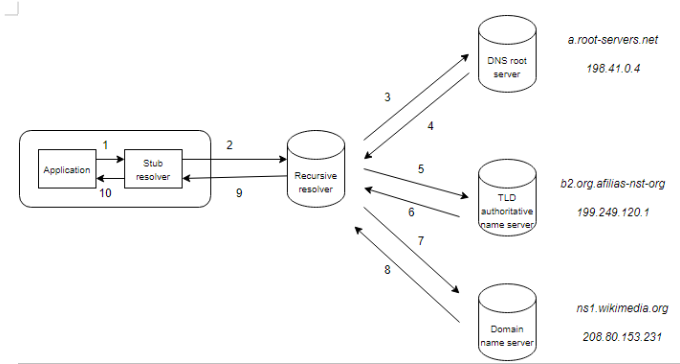
- Application to stub resolver – Where is wikipedia.org?
- Stub resolver to recursive resolver – Where is wikipedia.org?
- Recursive resolver to root DNS server – Where is wikipedia.org?
- Root DNS server to recursive resolver – Ask top level domain authoritative name server for .org TLD like b2.org.afilias-net.org. (bunch of different name servers for redundancy).
- Recursive resolver to TLD authoritive name server – Where is wikipedia.org?
- TLD authoritive name server to recursive resolver – Ask domain name server for wikipedia.org – ns1.wikimedia.org (bunch of different name servers for redundancy).
- Recursive resolver to domain name server – Where is wikipedia.org?
- Domain name server to recursive resolver – Here’s the A record for wikipedia.org – 103.102.166.224
- Recursive resolver to stub resolver – wikipedia.org can be found at 103.102.166.224
- Stub resolver to application – wikipedia.org can be found at 103.102.166.224
Explainers for each applications
Section titled “Explainers for each applications”- Application – Any application which needs to resolve a domain name like browser (Mozilla Firefox), mail client (Thunderbird) etc.
- Stub resolver – A local, system-wide cache like
systemd-resolved.dnsmasqetc. They hold the first level of system cache for DNS. - Recursive resolver – A dedicate program like BIND, knot, etc which does the actual domain tree traversal ie recursion. It can be running on local or remote system.
- DNS root server – 13 DNS root servers. Their IP address is pre-programmed in DNS revolvers to start DNS query from. Complete list can be found at https://www.iana.org/domains/root/servers .
- TLD authoritative name server – Each top level domain like .org has a authoritative name server set which holds name servers for each domain. Run
dig NS org.to find them for .org TLD. - Domain name server – For each domain, a name server is defined which responses for each query for
DNS Message
Section titled “DNS Message”To find more details about DNS, we can use a utility called dig. Run dig wikipedia.org to do a DNS query. Response for which would look something like this:
; <<>> DiG 9.18.12-1-Debian <<>> wikipedia.org;; global options: +cmd;; Got answer:;; ->>HEADER<<- opcode: QUERY, status: NOERROR, id: 23667;; flags: qr rd ra; QUERY: 1, ANSWER: 1, AUTHORITY: 0, ADDITIONAL: 1
;; OPT PSEUDOSECTION:; EDNS: version: 0, flags:; udp: 1232; COOKIE: d8a190b00c8d01c201000000646f2e418b9d49b5081970dc (good);; QUESTION SECTION:;wikipedia.org.                 IN      A
;; ANSWER SECTION:wikipedia.org.          600     IN      A       103.102.166.224
;; Query time: 523 msec;; SERVER: 10.23.0.30#53(10.23.0.30) (UDP);; WHEN: Thu May 25 15:15:37 IST 2023;; MSG SIZE  rcvd: 86
There are 5 sections to the query -
- Header – shares status of query/resposne, flags and other info.
- Question section – what is being asked/queried – in our case A record for wikipedia.org
- Answer section – response received – in our case we received A record response of type IN (Internet) for wikipedia.org with a time to live (TTL) with IP 103.102.166.224
- Authority section – SOA response, only avail in authoritative name server response like root-servers.net. Also see authority response in header section as 0.
- Additional info section – resolver info, time, size etc.
DNSSEC
Section titled “DNSSEC”A public-private key method to digitally sign the zone being served. Each domain name server signs the zone they’re serving with their private key. The public key is also shared with the zone.
The trust of public key comes from signature of public key by parent zone. For wikipedia.org, their public key would be signed by .org TLD authoritative name server’s private key, who’s public key would in turn be signed by DNS root servers private key. All recursive resolvers have already pre-defined to trust root’s public key’ making the trust anchor.
Read more
Section titled “Read more”- A warm welcome to DNS - https://powerdns.org/hello-dns/
- Chapter 4 - How DNS work from DNS and Bind, 4th Edition - https://docstore.mik.ua/orelly/networking\_2ndEd/dns/index.htm
- Understanding linux dig command - https://www.howtouselinux.com/post/linux-dig-dns